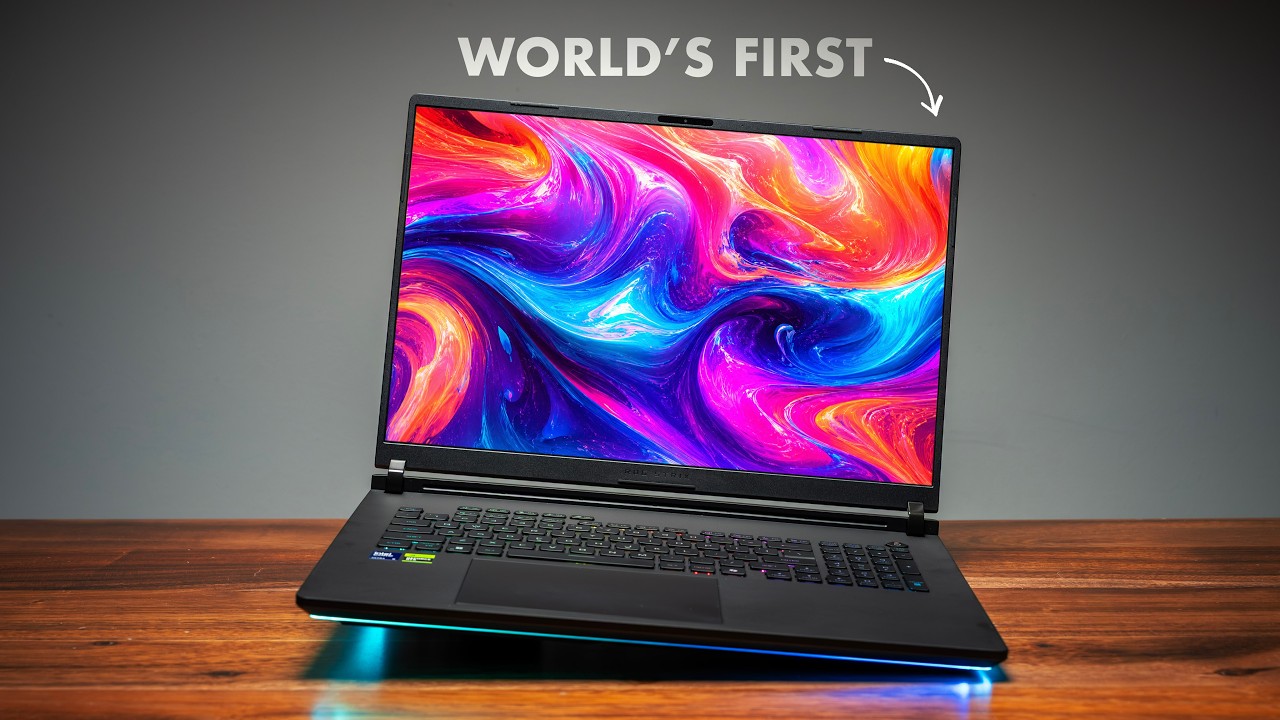
ASUS ROG Zephyrus Duo 16 (2026) Review: The Dual-Screen Laptop Finally Grew Up
I've had the 2026 ASUS ROG Zephyrus Duo 16 for a couple of weeks, and I've run it through everything. But the most interesting thing about this laptop isn't a spec on the box — it's that ASUS is one of the only brands left still building a dual-screen laptop at all. HP tried it. Microsoft tried it. Lenovo has one but hasn't refreshed it. Almost everyone backed off. ASUS kept going — and after six years and three generations, this is the first one that feels like a finished product instead of an experiment.
Here's the full breakdown.
Quick Verdict
The 2026 Zephyrus Duo 16 is the version of this laptop ASUS has been trying to build since 2020. Two identical 16-inch 3K OLED screens, a magnetically detachable keyboard, a kickstand, and five genuine usage modes. It trades some peak multi-core CPU performance for a five times battery life improvement over the last Duo — which I think is the right call. But at $5,500 USD it's a flagship priced like one, aimed at a very specific person. If you don't actually need two screens, there are far better-value gaming laptops.
Best For:
- Creators who want a true second monitor that travels with them
- Anyone who color grades, edits timelines, or runs reference material alongside their work
- People who want one machine that flips between work and gaming
- The niche buyer who values a unique form factor over price
ASUS ROG Zephyrus Duo 16 (2026) Specs
| Component | Specification |
|---|---|
| Processor | Intel Core Ultra 9 386H (Panther Lake) — 4 performance + 8 efficiency + 4 low-power efficiency cores |
| Graphics | Up to NVIDIA GeForce RTX 5090 Laptop GPU, up to 150W TGP |
| Displays | Two 16" 3K (2880x1800) OLED, 120Hz, 16:10, anti-glare, Pantone validated, factory calibrated, touch + stylus |
| Memory | Up to 64GB |
| Connectivity | Wi-Fi 7 |
| Battery | 90Wh |
| Weight | ~2.82 kg |
| Keyboard | Magnetically detachable, pogo-pin + Bluetooth, single-zone RGB, metal build |
| Ports | 2x Thunderbolt 4, 2x USB 3.2 Gen 2, HDMI 2.1 (FRL), 3.5mm combo jack, SD card slot, MUX switch |
| Webcam | 1080p |
| Audio | 4 speakers — 2 tweeters, dual force woofers |
| Price | $5,500 USD (as configured) |
Check out the ASUS ROG Zephyrus Duo 16 here
Three Generations: Why This One Makes Sense
You can't really understand the 2026 Duo without seeing what didn't work in the first two. (Note: ASUS sponsored this evolution segment of the video — the rest of the review is independent.)
Gen 1 — Zephyrus Duo 15 (2020)
The original made you stop in the store. Nobody had seen anything like it. The headline was a 14-inch ScreenPad Plus that physically tilted up 13° the moment you opened the lid, driven by ASUS's "Geneva gear hinge" — a genuinely beautiful piece of mechanical design that timed the main display and secondary screen so they never collided.
But the lift wasn't just ergonomics. Raising the screen opened a massive air intake underneath it — ASUS called it AAS Plus — so what looked like a UI gimmick was actually a thermal solution. Combined with liquid metal, it ran an Intel Core i9 and an RTX 2080 Super Max-Q in a chassis that on paper shouldn't have handled that load.
What it got right: it proved a dual-screen laptop could compete with single-screen flagships on raw performance. What it didn't: there was a black bezel gap between the main display and the ScreenPad — the two screens never felt like one space — and the secondary screen was a narrow 32:10 strip. Useful for tool palettes, but not a real second monitor.
Gen 2 — Zephyrus Duo 16 (2022)
The upgrades told you exactly what ASUS was hearing from real users. The Geneva gear hinge gained a sliding rail, so the secondary screen now lifted and slid forward, nearly touching the main display. That bezel gap was gone. AAS Plus became AAS Plus 2.0 — 28.5mm of intake space, roughly 30% more airflow. The display moved to mini LED, and the internals jumped to a Ryzen 9 7945HX and an RTX 4090.
The visual disconnect was fixed — the screens finally felt like one workspace. But the layout was still primary-plus-secondary. Plug into a real 27-inch monitor at your desk and the ScreenPad went unused. The hardware was incredible; the use case was still narrow.
Gen 3 — Zephyrus Duo 16 (2026)
This is where ASUS stopped iterating and started over. There's no primary and secondary screen anymore. Both displays are full 16-inch 3K 120Hz OLED touchscreens — same panel, same resolution, same color profile, identical.
The Displays: The Whole Reason This Laptop Exists
Both panels are 16-inch 3K (2880x1800) OLED, 120Hz, anti-glare, Pantone validated, factory calibrated, with touch and stylus support, at a 16:10 aspect ratio.
The critical part is that they are the exact same panel. On the previous Duo, dragging a video timeline down to the secondary screen would shift the colors slightly because the panels weren't matched. On this one you can color grade across both displays and trust what you're seeing. That's the difference between a bonus screen and a real second monitor.
The Detachable Keyboard and Five Modes
The keyboard is where this generation gets genuinely interesting. It's a full chiclet keyboard with single-zone RGB, a solid metal build, and it attaches magnetically via pogo pins. Docked, it sits over the bottom display and the Duo behaves like a normal laptop. Pull it off and the bottom display becomes a second 16-inch monitor, with a metal kickstand snapping out to hold the angle.
Detached, the keyboard works over Bluetooth, so you can position it anywhere. Latency is solid wirelessly — though noticeably better on the pogo pins.
That unlocks five real usage modes:
- Laptop mode — keyboard attached, works like any normal laptop
- Dual-screen mode — keyboard detached, both 16-inch screens stacked vertically (the one I used most for long work sessions)
- Book mode — folded like a book, both screens facing you
- Tent mode — propped up for media or presentations
- Sharing mode — laid flat, one screen facing you, one facing the person across the table
Performance: The Results Weren't What I Expected
I tested the 2026 Duo against the last two Zephyrus Duos and a few other laptops for context. Some of this went how you'd expect. Some didn't.
CPU: Panther Lake Wins Single-Core, Loses Multi-Core
| Test | 2026 Core Ultra 9 386H | 2022 Ryzen 9 7945HX | Winner |
|---|---|---|---|
| Single-core | 508 | 460 | 2026 (~10%) |
| Multi-core | — | ~35% faster | 2022 |
| PugetBench Photoshop | 8,410 | 10,675 | 2022 |
| Firefox compile | 24 minutes | 19 minutes | 2022 |
Read that table again. The 2022 laptop's CPU is still meaningfully faster than the 2026 one in heavy multi-threaded work. Panther Lake takes single-core on newer architecture and better IPC — exactly what you'd want — but it loses multi-core badly. There's a good reason for that, and it's the battery section below.
GPU: This Is Where 2026 Pulls Away
The RTX 5090 isn't close to the old 4090 — it's roughly 29% faster, pulling nearly 150W TGP in turbo mode versus 130W on the 2022 model. And it changes creative workflows that lean on GPU acceleration:
- Premiere Pro: 2026 Duo wins by 27%
- Blender: 2026 Duo wins by 15%
Gaming Benchmarks (Frame Generation Off)
| Game | 1920x1200 | Native 2880x1800 |
|---|---|---|
| F1 25 | 165 FPS | 150 FPS |
| Dirt 5 | 150 FPS | — |
| Black Myth: Wukong | 68 FPS | 53 FPS |
| Cyberpunk 2077 | — | 71 FPS |
These are raw numbers with no DLSS and no frame generation. Turn those on and Cyberpunk crosses 200 FPS at native — which is what most people will actually do. In turbo mode the GPU sits around 140W; manual mode lets you push it to its full ceiling. Fan noise is also significantly quieter than the 2022 model.
Battery Life: The Five-Times Jump
Here's the reason that multi-core deficit exists — and why I think it's a good trade.
In my PCMark Modern Office battery test, the 2022 Duo lasted 3.5 hours. The 2026 model lasted over 17 hours with one screen on. That's a five-times improvement. Even with both screens running, you're getting roughly three times the battery life of the predecessor.
Panther Lake gives up some peak multi-threaded throughput because Intel split the chip into four performance cores, eight efficiency cores, and four low-power efficiency cores. That low-power cluster is what crushes idle and light-workload power draw. The AMD 7945HX has zero efficiency cores — it's a 16-core monster optimized for sustained throughput, not battery life. ASUS chose battery, and on a laptop built to be used in five different positions away from a desk, that's the right priority.
The Honest Downsides
This is a flagship, and it asks things of you that most laptops don't:
- Price. As configured, this is $5,500 USD. That's not a value pick — it's aimed at a very small niche.
- Not a lap laptop. With the keyboard detached and the kickstand out, you need a desk or table.
- A real learning curve. Five modes, ScreenXpert, Armoury Crate, MyASUS, dual-screen window management — the first 48 hours you'll be fighting it. After about a week it clicks. But that onboarding cost is real.
- Multi-core CPU regression. If your work is purely sustained multi-threaded compute, the 2022 chip is still faster.
Who Should Buy the Zephyrus Duo 16 (2026)?
Perfect For:
Mobile creators: If you color grade or edit and you've always wanted your second monitor to come with you, this is the first Duo that delivers a true matched second display — not a compromised strip.
One-machine work-and-play buyers: It genuinely flips between a productivity setup and a portable RTX 5090 gaming rig. Few laptops do both this convincingly.
The form-factor niche: As I said in the video — I can honestly picture a well-off day trader who travels constantly but also loves to game picking this up. If you're that person, nothing else really does what this does.
Consider Alternatives If:
- You don't actually need two screens — a single-screen gaming laptop gives you more performance for far less money
- Your workload is heavy sustained multi-core CPU compute
- You need a laptop you can genuinely use on your lap
- $5,500 is not a comfortable spend for a niche form factor
Pricing and Where to Buy
At $5,500 USD as configured, the Zephyrus Duo 16 is priced like the flagship it is. It's not trying to be the best value — it's trying to be the only laptop that does this, and right now it basically is.
Check out the ASUS ROG Zephyrus Duo 16 here
Final Thoughts
After six years and three generations, the Zephyrus Duo finally feels finished instead of experimental. Gen 1 proved a dual-screen laptop could perform. Gen 2 made the two screens feel like one space. Gen 3 made the second screen a real, matched, full-size monitor — and added a detachable keyboard and kickstand that turn one machine into five.
The headline trade is real: ASUS gave up some sustained CPU performance for five times the battery life of the last Duo. For a laptop built to be used everywhere except a fixed desk, that's the right call. But this is still a $5,500 machine for a specific person. If you need two screens that travel with you, nothing else competes. If you don't — and you just want a great gaming laptop — there are many fantastic options for a lot less.
Frequently Asked Questions
Q: Is the 2026 Zephyrus Duo 16 faster than the 2022 model? A: It depends on the workload. The RTX 5090 GPU is about 29% faster and wins creative tasks like Premiere Pro (+27%) and Blender (+15%). But the 2022 model's Ryzen 9 7945HX is still about 35% faster in multi-core CPU work.
Q: Why is the new CPU slower in multi-core? A: Intel's Panther Lake chip prioritizes efficiency — 4 performance, 8 efficiency, and 4 low-power efficiency cores. That design trades peak multi-threaded throughput for a five-times battery life improvement over the 2022 Duo.
Q: How is the battery life? A: Excellent for this class. Over 17 hours in the PCMark Modern Office test with one screen on, and roughly 3x the 2022 model even with both screens running.
Q: Can you use it on your lap? A: Not really when the keyboard is detached and the kickstand is out — it needs a flat surface. In docked laptop mode it works like a normal laptop.
Q: Is the keyboard wireless? A: Yes. It attaches magnetically via pogo pins, but works over Bluetooth when detached. Latency is solid wirelessly and better still on the pogo pins.
Q: Who is this laptop actually for? A: A narrow niche — creators who want a true portable second monitor, and people who want one machine for both serious work and high-end gaming. At $5,500, it's not a mainstream pick.
Last Updated: May 2026 Affiliate Disclosure: This article contains affiliate links. If you purchase through these links, we may earn a commission at no extra cost to you.